
Shaders
A Shader node is a picture written in WGSL. It comes with 40 presets, from Plasma to Liquid Chrome, Fire, Lasers, Fractal, Code Rain, Traces, Reaction and V Beams, and it runs your own code just as well. Its parameters become knobs in the inspector, mappable like any other value, and the music is already in it to read.
Shader FX is the same for effects: it takes a picture in and changes it, with 25 presets from Glitch and VHS to LED Wall, God Rays and Shake.
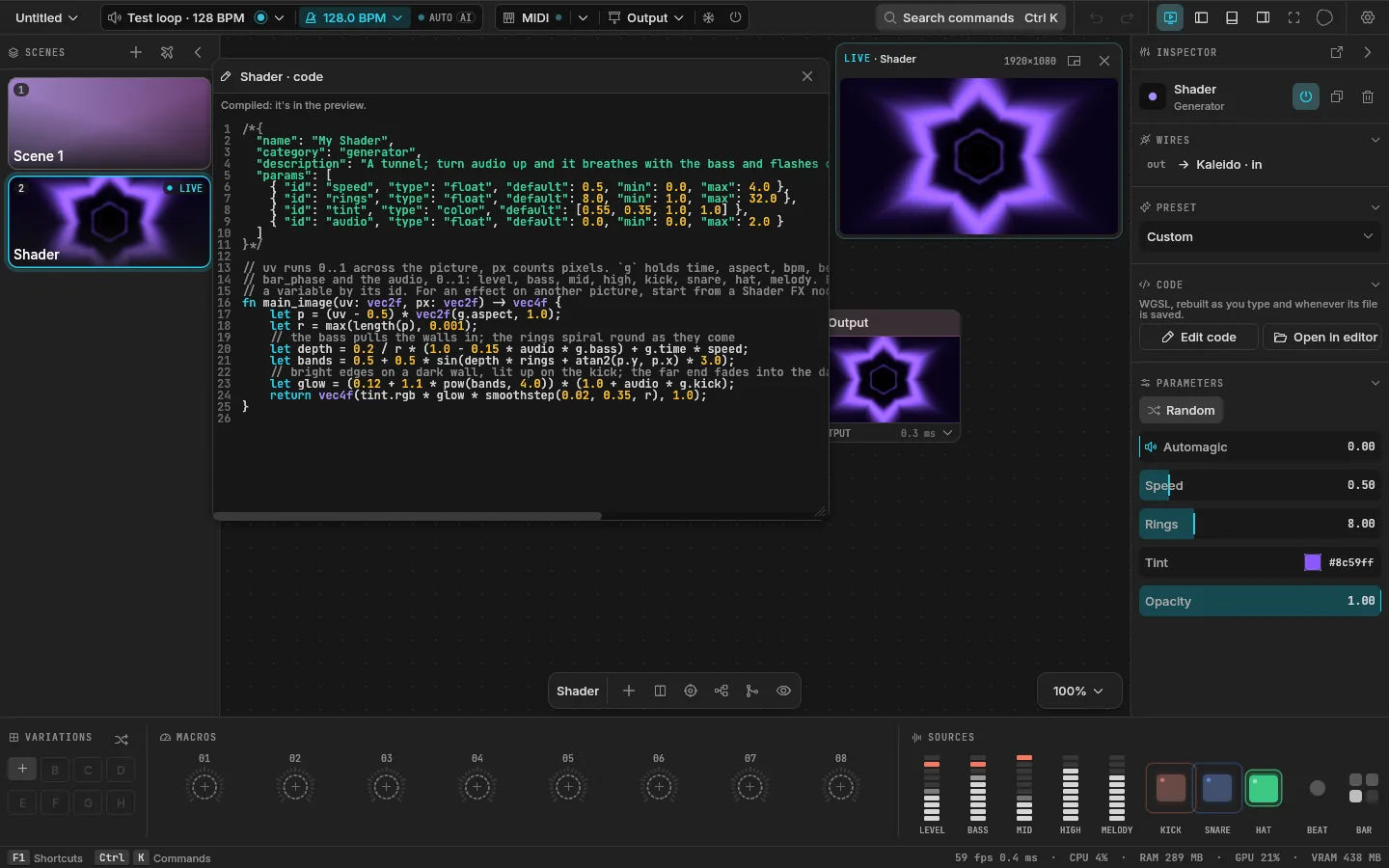
Edit one
Select a Shader node. In the inspector:
- Preset picks one of the presets, or shows Custom once you've changed the code.
- Edit code opens Velo's editor. It compiles as you type, and the picture changes with it.
- Open in editor opens the shader's file in your own editor. Save it there and Velo picks it up.
- Random under the parameters throws them somewhere new.
A mistake never reaches the output: the error shows at its line, and the node keeps running its last good code until you fix it.
In a saved project, each shader is a plain .wgsl file in the project's shaders/ folder, so it diffs and versions well.
The format
A shader is one file: a JSON header in a comment, then a main_image function. This is the code a new Shader node starts from:
/*{
  "name": "My Shader",
  "category": "generator",
  "description": "A tunnel; turn audio up and it breathes with the bass and flashes on the kick",
  "params": [
    { "id": "speed", "type": "float", "default": 0.5, "min": 0.0, "max": 4.0 },
    { "id": "rings", "type": "float", "default": 8.0, "min": 1.0, "max": 32.0 },
    { "id": "tint", "type": "color", "default": [0.55, 0.35, 1.0, 1.0] },
    { "id": "audio", "type": "float", "default": 0.0, "min": 0.0, "max": 2.0 }
  ]
}*/

fn main_image(uv: vec2f, px: vec2f) -> vec4f {
    let p = (uv - 0.5) * vec2f(g.aspect, 1.0);
    let r = max(length(p), 0.001);
    // the bass pulls the walls in; the rings spiral round as they come
    let depth = 0.2 / r * (1.0 - 0.15 * audio * g.bass) + g.time * speed;
    let bands = 0.5 + 0.5 * sin(depth * rings + atan2(p.y, p.x) * 3.0);
    // bright edges on a dark wall, lit up on the kick; the far end fades into the dark
    let glow = (0.12 + 1.1 * pow(bands, 4.0)) * (1.0 + audio * g.kick);
    return vec4f(tint.rgb * glow * smoothstep(0.02, 0.35, r), 1.0);
}uvruns from 0 to 1 across the picture, from the top left.pxcounts pixels.- Each parameter is a variable named by its
id: writespeed, notparams.speed. main_imagereturns the pixel's color.
Parameters
| Type | Knob | Example |
|---|---|---|
float | A slider from min to max | { "id": "speed", "type": "float", "default": 0.5, "min": 0, "max": 4 } |
int | Whole steps; with names, a choice | { "id": "style", "type": "int", "default": 0, "names": ["Stripes", "Rings", "Dots"] } |
bool | A switch | { "id": "invert", "type": "bool", "default": false } |
color | A color, RGBA | { "id": "tint", "type": "color", "default": [1, 0.35, 0.1, 1] } |
vec2 | Two values, x and y | { "id": "root", "type": "vec2", "default": [0, 0.64], "min": -1, "max": 1 } |
An int with up to three names shows as buttons, with more as a menu.
What Velo gives every shader
g holds the time and the music. The audio values run from 0 to 1.
| Name | What it is |
|---|---|
g.time, g.delta, g.frame | Seconds since start, seconds since the last frame, frames so far |
g.resolution, g.aspect | The picture's size in pixels, its width over its height |
g.bpm, g.beats | The tempo, and the beats counted so far |
g.beat_phase, g.bar_phase | 0 to 1 through the beat, and through the bar |
g.level, g.bass, g.mid, g.high | The levels |
g.kick, g.snare, g.hat | The hits, as envelopes |
g.melody | How much of the sound is tune |
g.level_time, g.bass_time, g.mid_time, g.high_time | Clocks that run as fast as their band is loud |
The _time clocks are the most musical thing to drive motion with: put g.bass_time where you'd put g.time and the motion surges with the bass and never jumps.
Two more, asked for in the header:
"feedback": truegives the shader its own last frame asprev, for trails and echoes."audio": truegives it the sound itself as the texturewave: row 0 the last 512 analysis steps of level, low, mid and high, row 1 the waveform, row 2 the spectrum from 30 Hz to 16 kHz."buffers": [{ "id": "a", "scale": 0.5 }]keeps up to four pictures from frame to frame, for simulations. Each is drawn by its own function,fn buffer_a(uv: vec2f, px: vec2f) -> vec4f, in order, beforemain_image, atscaleof the canvas each way (1 if you leave it out). Every function reads every buffer by its id (textureSampleLevel(a, smp, uv, 0.0)): what an earlier one drew this frame, and what itself and the later ones drew last frame;main_imagesees them all as of this frame. A buffer nothing has drawn in yet is zeros, so write your simulation to start from that. The Reaction preset is four buffers stepping reaction diffusion.
Effects
An effect declares "category": "effect" and an input, and reads it with textureSample. A new Shader FX node starts from this:
/*{
  "name": "My Effect",
  "category": "effect",
  "inputs": [{ "id": "src", "type": "texture" }],
  "params": [
    { "id": "zoom", "type": "float", "default": 1.0, "min": 0.5, "max": 4.0 },
    { "id": "audio", "type": "float", "default": 0.0, "min": 0.0, "max": 1.0 }
  ]
}*/

fn main_image(uv: vec2f, px: vec2f) -> vec4f {
    let z = zoom * (1.0 + 0.1 * audio * g.kick);
    return textureSample(src, smp, (uv - 0.5) / z + 0.5);
}
Every effect also gets an Amount knob from 0 to 1. Velo mixes the result with the input by it, so at 0 the effect passes its input through untouched.
ISF shaders
An ISF shader (the GLSL format VDMX, Resolume and Synesthesia read, from isf.video) becomes a Shader node:
- press Ctrl Shift I on the canvas and pick the file;
- or drop a
.fs,.fragor.glslfile on the window.
Its inputs become knobs: float, bool and event, long (a choice), color and point2D. An image input makes it an effect, with Velo's Amount. The code stays GLSL in the project, editable in Velo or any editor, and mistakes come back at your own lines.
Not supported yet: several passes and persistent buffers, more than one image input, ISF's audio and audioFFT inputs, and ISF's own vertex shaders.
Ask the AI
The AI panel writes shaders too: describe the look and it writes the WGSL, checks that it compiles, and wires it in. See AI.