
Scenes and launching
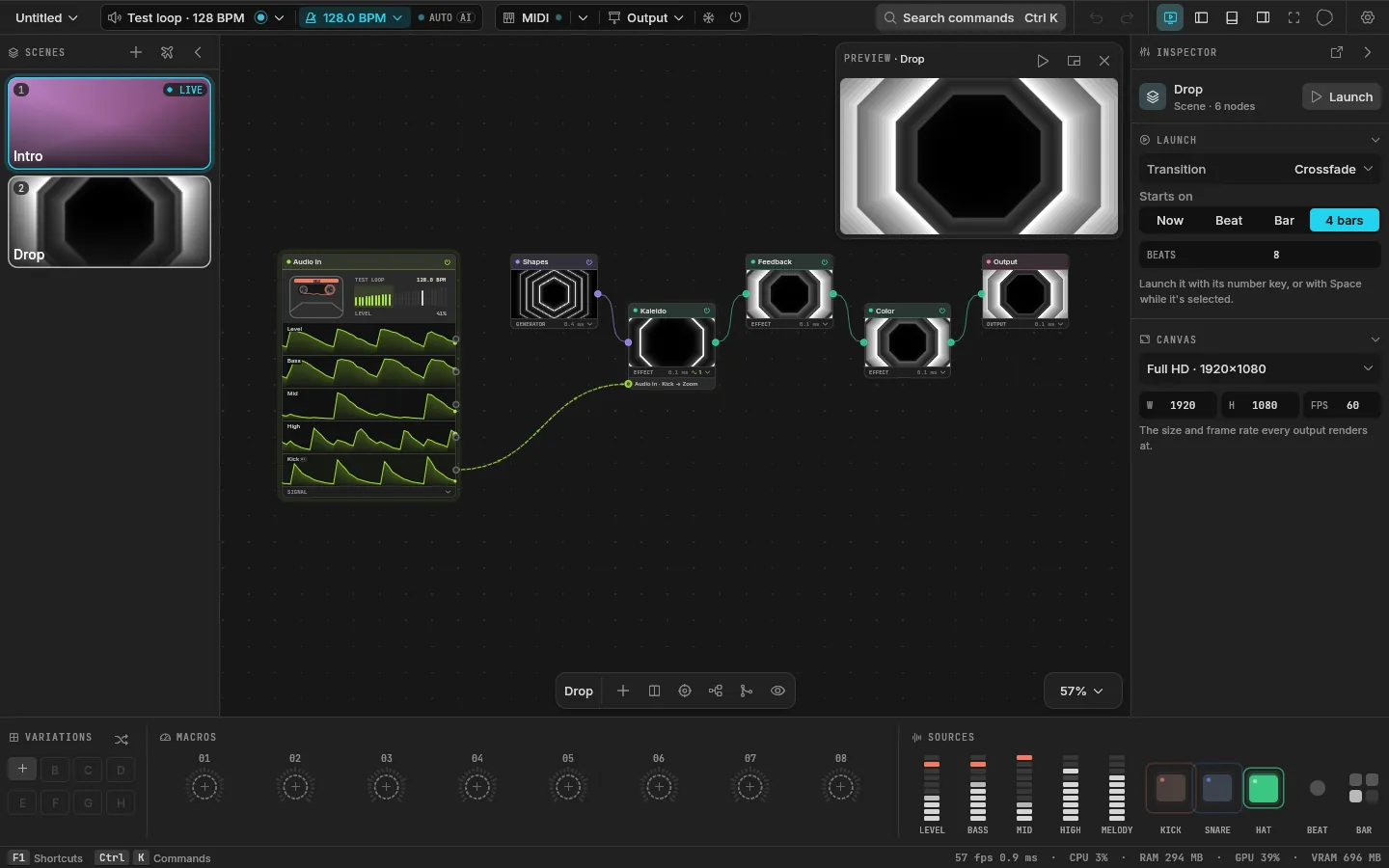
A scene is one look you can launch: "Intro", "Build", "Drop". Each scene has its own graph, so two scenes can be built completely differently. The scenes panel on the left shows a card for each, with a live thumbnail.
Making scenes
- The + at the top of the scenes panel starts a new scene from a template: Velo, Tunnel, Kaleido Bloom, Pulse Rings or Liquid. Each is a small patch already moving with the music, with named macros. Ctrl Shift N makes an empty one.
- Double-click a card to rename it, or press F2.
- Right-click a card for more: launch it, duplicate it, give it an icon, delete it (Ctrl Backspace).
Live and selected
Two scenes matter at any moment:
- The live scene is the one on the outputs. Its card says LIVE.
- The selected scene is the one on the canvas, the one you're editing.
When they're different, Velo renders both: the outputs keep the live one, and the preview shows the selected one, marked PREVIEW, with a Launch button. When they're the same, the preview says LIVE. You can build the next look while the audience still sees this one.
Launching
| To launch | Do |
|---|---|
| Scene 1 to 9 | Press 1 to 9 |
| The selected scene | Tap Space (holding it pans the canvas), or click Launch on the preview |
| Any scene | Right-click its card and choose Launch |
| From a controller | Learn a pad on a scene card, or send a program change (MIDI and OSC) |
Launching the live scene again calls off a launch that's waiting.
When it starts
With no node selected, the inspector shows the scene's Launch settings: how this scene comes in.
- Starts on: Now, the next Beat, the next Bar, or the next 4 bars. A launch waits for that boundary and its card shows a countdown ring. The grid counts from the tempo's first beat (a tap series' first tap, or a resync), so bars land where the music's do.
- Transition: how it replaces the live one.
- Beats: how long the transition lasts, 1 to 32 beats.
One launch waits at a time: a new one replaces it.
Transitions
| Transition | What you see |
|---|---|
| Cut | The new scene at once |
| Crossfade | One picture fading into the other |
| Wipe | A soft edge sweeping across |
| Zoom | Each picture read nearer or further as they swap |
| Glitch | Blocks turning over at random, colors split |
| Flash | Through white |
Every transition but Cut takes the length in beats. During it both scenes render, and the mix happens in the same pass that draws the outputs, so it costs almost nothing extra.
Autopilot
The airplane at the top of the scenes panel turns on the autopilot, for nights when you can't drive the visuals yourself. While it's on, Velo launches the next scene by itself:
- every 4, 8, 16 or 32 bars, or every so many seconds;
- in order, or at random (never the scene that's going out);
- and, if you ask, on a drop: when the music suddenly gets much louder than it has been, at least 4 bars after the last change.
The autopilot launches a beat ahead, so each scene's own boundary lands on the turn. It's off every time Velo starts; its settings stay.
Never a hitch
The selected scene is always built, so launching it is instant. A scene that isn't built yet is built first, in the background, and launches on the next boundary after it's ready. The last few scenes you used stay built, so going back and forth is instant too.