
Introduction
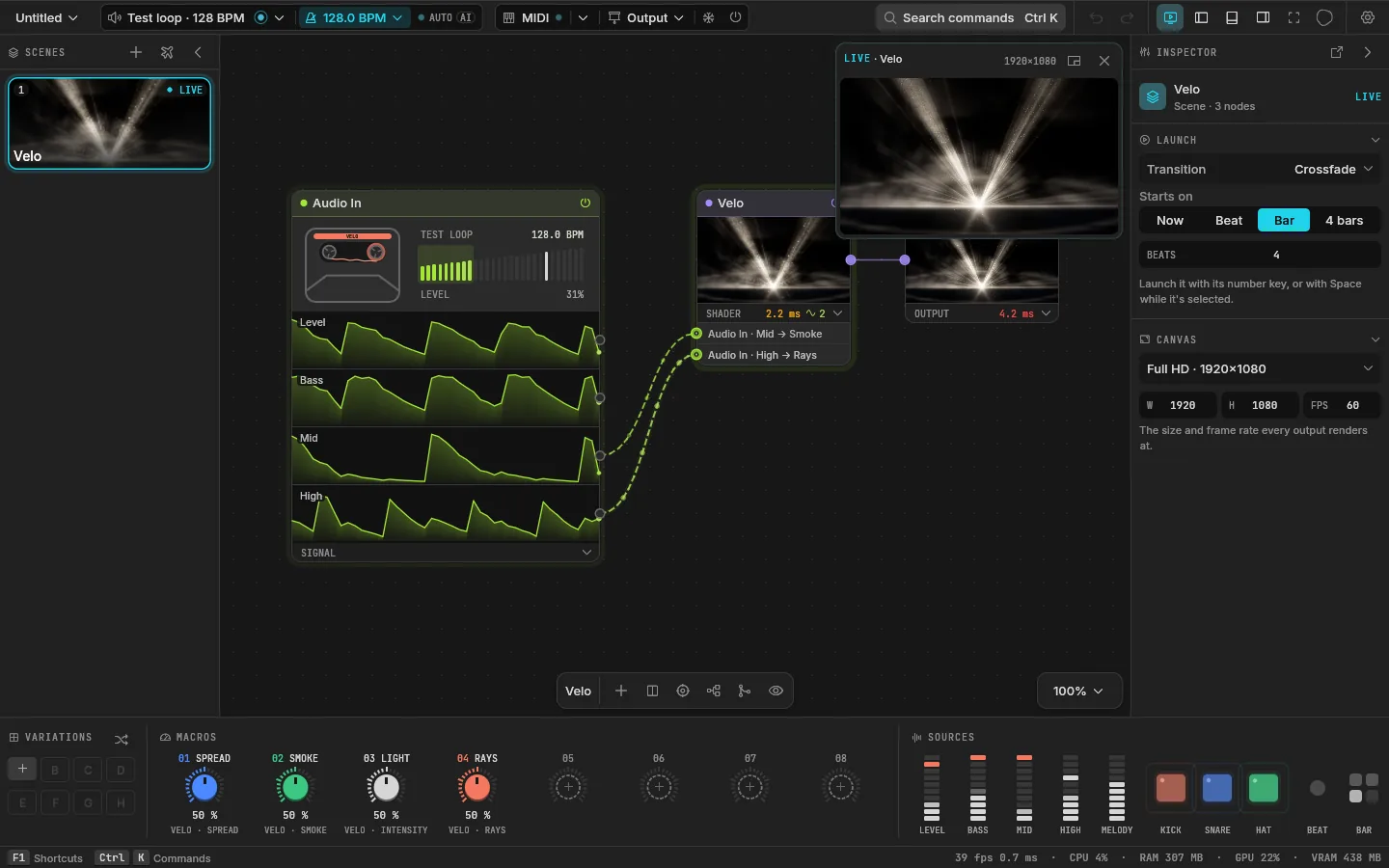
Velo is an instrument for live visuals. It listens to the music your computer plays, or to any audio input, and moves pictures with it: the kick punches a zoom, the bass opens a shape, the hats flicker a light. You build the pictures from nodes on a canvas, play them as scenes, and send them fullscreen to a projector, a screen or another app.
It is free and open source, built in Rust on wgpu, and runs on Windows and macOS.
Who it is for
- DJs and producers who want visuals for their own sets with no VJ background. Velo opens on a demo that already moves with whatever the computer plays.
- VJs who need it to hold up for a night: MIDI on everything, scenes launched on the beat, a blackout and a freeze one key away, Spout and NDI out.
- Shader artists who want a shader on stage in minutes: write WGSL or import ISF, its parameters become knobs, and the audio is already there to read.
The words
Velo has a small vocabulary. These are all the words the guide uses.
| Word | What it is |
|---|---|
| Project | One show. Saved as a .velo folder: a plain-text project.ron and a shaders/ folder with each shader as its own file. |
| Scene | One look you can launch. Each scene is its own graph of nodes, with eight macros and up to eight variations. |
| Node | A card on the canvas. Generators make a picture, effects change one, composites mix several, the Output is where the picture leaves. |
| Signal | A number that moves: Audio In's bands and hits, the tempo, an LFO, a macro. |
| Mapping | A signal moving a value: "Kick moves Zoom by 50 %, with a 5 ms attack and a 150 ms release". |
| Output | Where the picture goes: the preview, a display, a window, Spout or NDI. |
How the window is laid out
- The canvas fills the middle: the selected scene's nodes, each showing its picture. Press Tab to add one.
- The scenes are on the left, a card each with a live thumbnail. Number keys launch them.
- The inspector is on the right: the selected node's values, or the scene's launch settings when nothing is selected.
- The deck runs along the bottom: the scene's variations, its eight macros, and every source moving live.
- The top bar holds what you glance at while playing: the audio input, the tempo, MIDI, the Output menu, Freeze and Blackout.
Each panel hides with a key, and \ hides them all (see Shortcuts).
What it is not
Velo is a 2D instrument: pictures in, pictures out, moved live. It is not a 3D engine (a Mesh node draws one model solid and lit and Particles fly a camera round points, with no scene graph, shadows or textures), a projection-mapping suite, a timeline editor or a lighting controller. Shaders cover the other 3D looks; tools like MadMapper are better at mapping.
Next
- Install Velo, or build it from the sources.
- Then take five minutes to go from silence to a projector.